The best client conversations rarely follow a script.
A client may begin with one question, reveal another concern halfway through, and remember an important detail just before hanging up. Meanwhile, the person helping them is listening, searching for information, taking notes, and thinking about what needs to happen next.
CMA Voice and Call Assist are designed to make that balancing act a little easier.
Consider this fictional – but familiar – morning.
Elena’s First Call of the Day
Elena is a counselor preparing for a full day of client calls. She knows which report she needs, but she cannot remember where it is located in CMA.
Instead of searching through menus, she opens CMA Voice and asks for the report in everyday language. CMA finds an accessible result and opens it for her.
She then asks CMA Voice to show the tasks assigned to her that are due today. CMA prepares the filters, reads them back, and waits for her confirmation before applying them.
Within moments, Elena is ready for her first call.
Her client, Marcus, has several questions and is clearly worried. He explains what has changed since their last conversation, pauses to find a document, and then circles back to something he mentioned earlier.
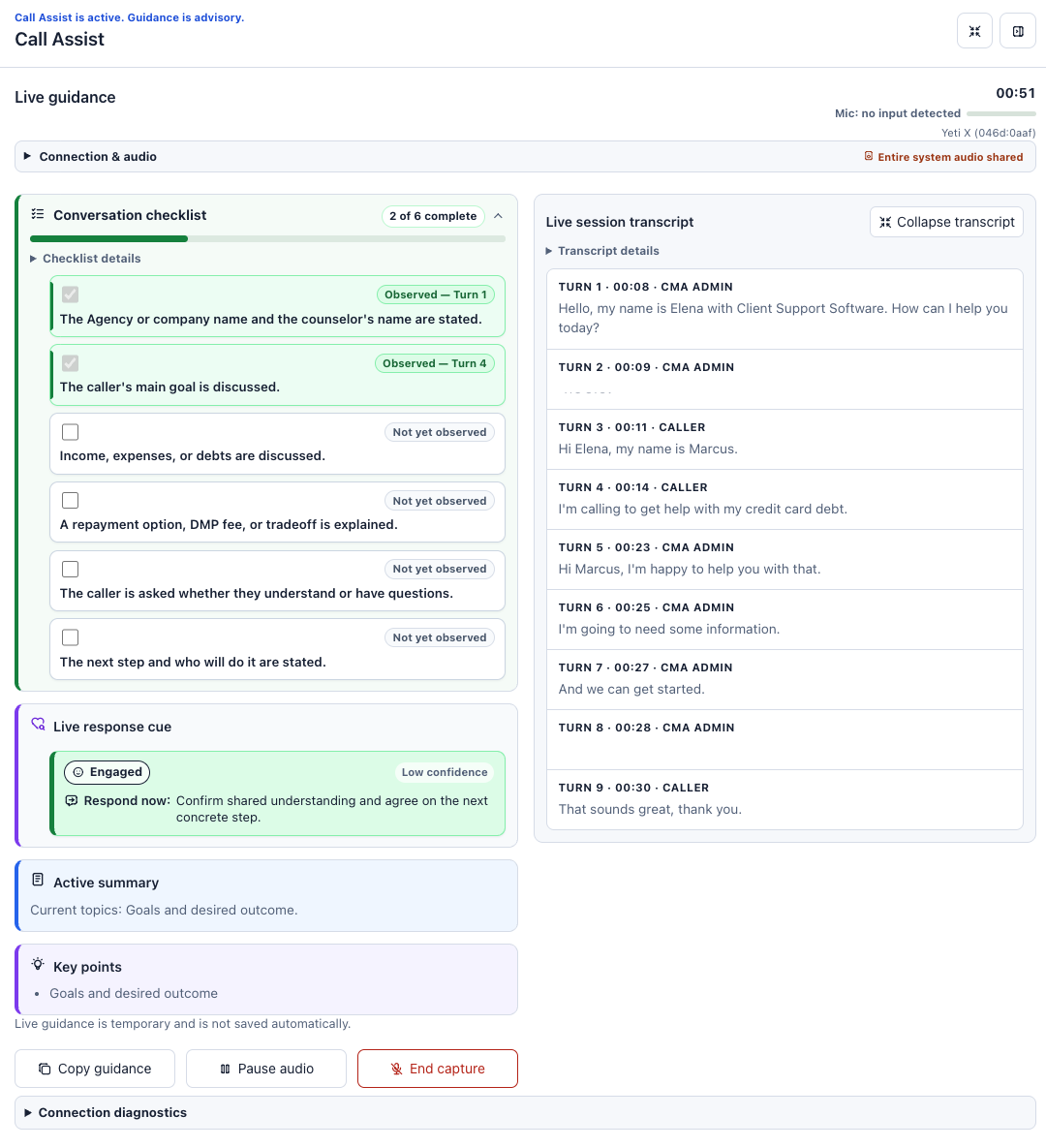
With Call Assist, Elena can concentrate on Marcus instead of trying to capture every detail while he speaks. The panel provides a live transcript, keeps track of key points, and updates the conversation checklist selected by her organization.
At one point, Call Assist offers a neutral response cue suggesting that part of the conversation may need clarification. Elena reviews it, decides it fits, and responds in her own words.
Call Assist does not speak to Marcus or take over the conversation. It simply helps Elena notice something she might otherwise have missed while managing the rest of the call.
When the call ends, Call Assist prepares an editable note draft. Elena corrects a date, adds context that only she would know, and saves the finished note through the normal CMA workflow.
The software did not handle the call, Elena did and she was able to focus her attention on listening.
What CMA Voice Can Do Today
CMA Voice is a working proof of concept. It already supports a useful set of everyday tasks while establishing the building blocks needed to bring conversational assistance into more parts of CMA.
Authorized users can currently speak or type requests to:
- Find and open accessible clients, reports, and system tools
- Describe the CMA page currently on screen
- Answer workflow questions using relevant CMA Knowledge Base articles
- Open a supporting Knowledge Base article
- Prepare filters on supported List pages
- Fill approved Task and Note fields for staff review
- Prepare an editable Client Note or Client Task draft
A staff member might ask:
- “Find client Maria Smith.”
- “Open the Task List.”
- “Show my tasks due this month.”
- “Where can I find instructions for this workflow?”
- “Summarize the page I’m viewing.”
- “Prepare a follow-up task for me to review.”
Usage and customer feedback will help identify where CMA Voice is most valuable.
If adoption grows, the same foundation can be extended to support additional CMA screens, applications, and workflows.
What Call Assist Brings to the Conversation
Call Assist supports authorized staff during live client calls. Depending on the prompt selected by the organization, it can provide:
- Live transcription
- A conversation checklist
- Timely response cues
- An active summary and key points
- Reviewed responses for common questions or concerns
- An editable note draft when the call ends
When supported caller audio is available, Call Assist may also identify caller-stated contact details. Staff review those suggestions and decide whether to apply them. CMA fills only eligible fields that are still blank and does not overwrite existing information.
Nothing is automatically said to the client, and no note or client record is automatically saved. The staff member remains responsible for the conversation and every resulting action.
For Those Curious About What’s Under the Hood
CMA Voice and Call Assist combine several cutting edge technologies:
- Browser based audio and WebRTC for responsive voice interaction
- OpenAI Realtime and speech transcription services
- CMA’s authenticated sessions and permission controls
- CMA Knowledge Base content for grounded workflow answers
- Supported CMA tools with review and confirmation safeguards
More Attention for the Person on the Other End
CMA Voice and Call Assist support different parts of the workday.
CMA Voice helps staff find the right place, locate information, and prepare supported actions with less searching. Call Assist helps them remain organized and attentive once a client conversation begins.
Neither feature is intended to replace experience, empathy, or professional judgment. Their purpose is to give those human qualities more room to work.
Both features are optional and controlled through CMA configuration and user permissions. Staff must review transcripts, guidance, field suggestions, and drafts before relying on them. Organizations also remain responsible for their established call disclosure and consent procedures.
The future of client service should not be less human. Used thoughtfully, technology can make it more human, by giving the person helping the client more time and attention to offer.
Call Assist provides realtime feedback when enabled for a conversation:
Contact Client Support Software to learn more about CMA Voice, Call Assist, availability, configuration, and training.