More Time for the Conversation: Introducing CMA Voice and Call Assist

The best client conversations rarely follow a script.

A client may begin with one question, reveal another concern halfway through, and remember an important detail just before hanging up. Meanwhile, the person helping them is listening, searching for information, taking notes, and thinking about what needs to happen next.

CMA Voice and Call Assist are designed to make that balancing act a little easier.

Consider this fictional – but familiar – morning.

Elena’s First Call of the Day

Elena is a counselor preparing for a full day of client calls. She knows which report she needs, but she cannot remember where it is located in CMA.

Instead of searching through menus, she opens CMA Voice and asks for the report in everyday language. CMA finds an accessible result and opens it for her.

She then asks CMA Voice to show the tasks assigned to her that are due today. CMA prepares the filters, reads them back, and waits for her confirmation before applying them.

Within moments, Elena is ready for her first call.

Her client, Marcus, has several questions and is clearly worried. He explains what has changed since their last conversation, pauses to find a document, and then circles back to something he mentioned earlier.

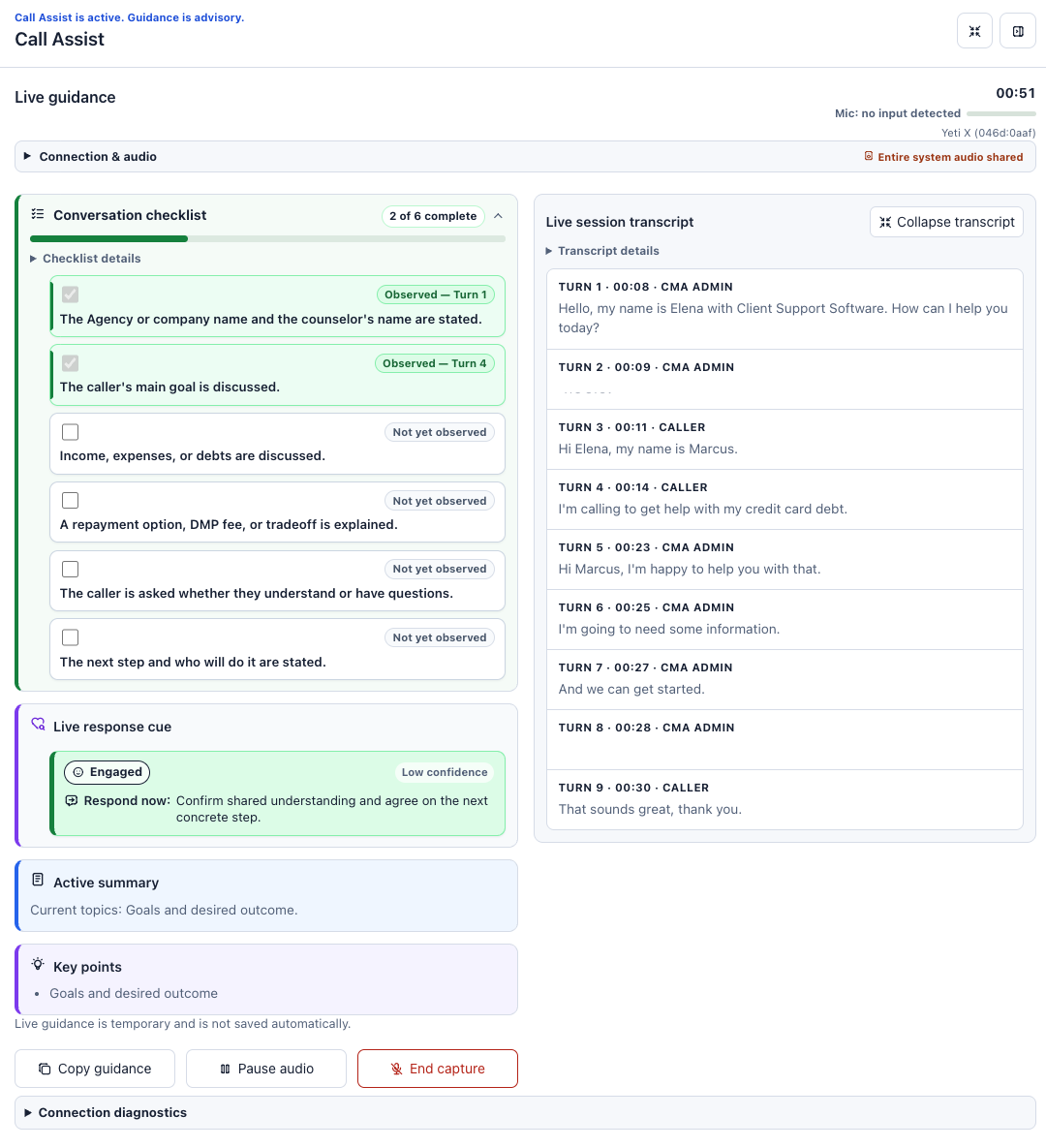
With Call Assist, Elena can concentrate on Marcus instead of trying to capture every detail while he speaks. The panel provides a live transcript, keeps track of key points, and updates the conversation checklist selected by her organization.

At one point, Call Assist offers a neutral response cue suggesting that part of the conversation may need clarification. Elena reviews it, decides it fits, and responds in her own words.

Call Assist does not speak to Marcus or take over the conversation. It simply helps Elena notice something she might otherwise have missed while managing the rest of the call.

When the call ends, Call Assist prepares an editable note draft. Elena corrects a date, adds context that only she would know, and saves the finished note through the normal CMA workflow.

The software did not handle the call, Elena did and she was able to focus her attention on listening.

What CMA Voice Can Do Today

CMA Voice is a working proof of concept. It already supports a useful set of everyday tasks while establishing the building blocks needed to bring conversational assistance into more parts of CMA.

Authorized users can currently speak or type requests to:

  • Find and open accessible clients, reports, and system tools
  • Describe the CMA page currently on screen
  • Answer workflow questions using relevant CMA Knowledge Base articles
  • Open a supporting Knowledge Base article
  • Prepare filters on supported List pages
  • Fill approved Task and Note fields for staff review
  • Prepare an editable Client Note or Client Task draft

A staff member might ask:

  • “Find client Maria Smith.”
  • “Open the Task List.”
  • “Show my tasks due this month.”
  • “Where can I find instructions for this workflow?”
  • “Summarize the page I’m viewing.”
  • “Prepare a follow-up task for me to review.”

Usage and customer feedback will help identify where CMA Voice is most valuable.

If adoption grows, the same foundation can be extended to support additional CMA screens, applications, and workflows.

What Call Assist Brings to the Conversation

Call Assist supports authorized staff during live client calls. Depending on the prompt selected by the organization, it can provide:

  • Live transcription
  • A conversation checklist
  • Timely response cues
  • An active summary and key points
  • Reviewed responses for common questions or concerns
  • An editable note draft when the call ends

When supported caller audio is available, Call Assist may also identify caller-stated contact details. Staff review those suggestions and decide whether to apply them. CMA fills only eligible fields that are still blank and does not overwrite existing information.

Nothing is automatically said to the client, and no note or client record is automatically saved. The staff member remains responsible for the conversation and every resulting action.

For Those Curious About What’s Under the Hood

CMA Voice and Call Assist combine several cutting edge technologies:

  • Browser based audio and WebRTC for responsive voice interaction
  • OpenAI Realtime and speech transcription services
  • CMA’s authenticated sessions and permission controls
  • CMA Knowledge Base content for grounded workflow answers
  • Supported CMA tools with review and confirmation safeguards

More Attention for the Person on the Other End

CMA Voice and Call Assist support different parts of the workday.

CMA Voice helps staff find the right place, locate information, and prepare supported actions with less searching. Call Assist helps them remain organized and attentive once a client conversation begins.

Neither feature is intended to replace experience, empathy, or professional judgment. Their purpose is to give those human qualities more room to work.

Both features are optional and controlled through CMA configuration and user permissions. Staff must review transcripts, guidance, field suggestions, and drafts before relying on them. Organizations also remain responsible for their established call disclosure and consent procedures.

The future of client service should not be less human. Used thoughtfully, technology can make it more human, by giving the person helping the client more time and attention to offer.

Call Assist provides realtime feedback when enabled for a conversation:
Contact Client Support Software to learn more about CMA Voice, Call Assist, availability, configuration, and training.

Client Support Software Announces MISMO HCDS v1.1 Integration and Deployment for Client Data Import and Export

February 26, 2026 – Client Support Software announced today that the MISMO Housing Counseling Dataset Specification (HCDS) v1.1 has been integrated and deployed in the Client Management Application (CMA) for both client data export and client data import.

This release gives housing counseling agencies a standards-based workflow to generate MISMO HCDS XML from client records and import MISMO HCDS XML into CMA to create new client records. The implementation supports both outbound and inbound data exchange, helping agencies reduce duplicate entry and improve consistency across counseling and partner systems.

Client Support Software pursued early adoption of HCDS v1.1 to help move the housing counseling industry forward and to adopt the best available tools for delivering high-quality service to housing counseling recipients.

“We made a deliberate decision to move early on MISMO HCDS v1.1 because the counseling industry benefits when systems can exchange data reliably and consistently,” said Daniel Mahanger, Managing Partner. “Early adoption is part of our long-term commitment to stronger interoperability, better workflow efficiency, and better outcomes for the people agencies serve.”

The deployed CMA capabilities include:

– MISMO HCDS v1.1 XML export

– MISMO HCDS v1.1 XML import

– On-screen preview workflows for export and import payloads

– Gap visibility tooling to support implementation maturity and data-quality planning

– Role- and agency-aware controls aligned to housing workflows

MISMO describes the Housing Counseling Dataset as a framework for exchanging counseling session, borrower participation, and outcome data to improve interoperability across systems. Client Support Software expects this deployment to help agencies align with emerging industry data standards while preserving practical day-to-day usability for counselors and operations teams.

Client Support Software would like to thank the MISMO Housing Counseling Data Workgroup for its leadership role in publishing the data specification.

About Client Support Software

Client Support Software provides technology solutions for housing counseling agencies and related service organizations. The CMA platform supports agency operations, reporting, and secure client-data workflows designed to improve service delivery.

For more information, contact support@clientsupportsoftware.com

GPT-4o and Beyond

Today, OpenAI hosted a Spring Update session where they introduced an exciting new model capable of processing audio, vision, and text in real-time. This model is twice as fast as GPT-4-Turbo and costs half as much. We’ve already upgraded the CMA to harness this powerful new model.

Current Use

We’re thrilled to keep enhancing our CRM platform with the latest advancements in Generative AI and Machine Learning. Our customers are already using OpenAI’s Whisper Large-v3 model for multi-lingual translation of call recordings. These transcriptions can be analyzed by GPT-4o and future models to generate concise, high-quality conversational summaries. These summaries help counselors and customer service representatives quickly grasp client interactions, including detailed housing counseling session summaries required for audits and overviews of enrollment and customer service calls. Additionally, OpenAI’s models are being used to evaluate conversations and efficiently handle complex ISO queries, significantly reducing the time required for analysis. A one-hour conversation can now be summarized, analyzed, and reported on within seconds.

AI Task Analysis Engine

Recently, we introduced generative AI capabilities into our Task workflow, integrating AI throughout the business process. This integration allows the analysis of client information across various communication channels like email, text, and phone, helping to securely identify the best-fit programs using financial data. This enables the creation of insights and reports that were previously unattainable with traditional statistical methods. The AI Task Engine also provides real-time recommendations to assist clients effectively.

GPT Agents

We have also introduced GPT Agents outside of the CRM to help build SQL queries for generating custom reports within the CMA. These agents can access the CRM’s database schema and are a step toward natural language reporting. Our GPT Agents can answer questions about system functionality and even process screenshots to provide step-by-step guidance on specific tasks. While these agents are still in the prototype stage and can occasionally produce suboptimal solutions, each advancement in reasoning and memory processing in new models enhances their performance. We are optimistic that these improvements will make interacting with the system easier and faster than ever.

Realtime Audio Processing

We’re also excited about the real-time audio capabilities demonstrated today, which will be available in the coming weeks. We’ve developed Voice Agents to assist with enrollment, qualification, counseling, and customer service. However, these agents were not ready for prime-time as they previously faced delays and pauses as they processed information. The new audio agents are a significant improvement, offering tone and emotional detection, nuanced communication styles, multi-language support, and smooth handling of real-time interruptions. As we offer a comprehensive solution, including phone system hosting, we look forward to integrating these tools to better support your counselors and agents in delivering high-quality assistance to more people.

Beyond

While OpenAI and others work on enhancing these models and their technical infrastructure, we’re committed to exploring how these tools can best support you and your customers. This presents an opportunity to reassess all job roles and discover how these tools can enhance, assist, and redefine our workflow to maximize satisfaction for both our team and those we serve.

We’re excited to unlock the potential of GPT-4o and future models, whether it’s GPT-5 or something entirely new.

Using Spyderbat for our SecOps

How Client Support Software uses Spyderbat to secure its cloud native environment

Client Support Software (CSS) is a leading provider of enterprise relationship management solutions for the debt and housing counseling industries. We help our clients streamline their workflows, improve their customer service, and grow their businesses.

As a cloud native company, we rely on Linux VMs and FreeBSD Jails to run our applications and services. Our hosted PBX solution integrates with our CRM software. It runs on Linux and we practice locking access down to reduce the attack surface as much as possible. However, we also face various security challenges in this dynamic and complex environment, such as:

  • Application drift: As we deploy new versions of our software, we need to ensure that they behave as expected and do not introduce any vulnerabilities or performance issues.
  • Supply chain attacks: We use third-party components and libraries in our software development lifecycle (SDLC), which could be compromised by malicious actors or contain hidden backdoors.
  • Zero-day exploits: We need to protect our systems from unknown threats that target unpatched vulnerabilities or exploit novel techniques.

To address these challenges, we partnered with Spyderbat, a cloud native runtime security platform that uses eBPF (extended Berkeley Packet Filter) technology to provide unparalleled visibility and protection for Linux VMs. With over two decades of experience hosting and building Customer Relationship software, we became a Spyderbat Design Partner. This allowed us to provide feedback on use cases that would help tune the product for our usage needs and help those with similar workflows.

Spyderbat is a game changer for us because it gives us the ability to harden our Linux cloud runtime environments and keep our applications rolling. Here are some of the benefits we get from using Spyderbat:

Flashback: Time travel for troubleshooting

Spyderbat’s Flashback feature is like having a continuous runtime digital recorder. It allows us to go back in time and see every step that led to an event of interest, such as a service interruption or operational changes made as a result of a software update.

With Flashback, we can eliminate the pain of scanning logs or reproducing errors. We can instantly pinpoint the root cause of any issue by viewing OS kernel traces that reveal every process, file, network, user, syscall, signal, etc. involved in the causal chain.

Flashback also provides early warning signs of troubling traces by alerting us when it detects anomalies or suspicious behaviors. This helps us proactively prevent problems before they escalate or impact our customers.

Guardian: Application drift detection

Spyderbat’s Guardian feature enables us to reduce interruptions by automatically comparing running applications against prior versions. It alerts us when it detects application drift, which could indicate bugs, performance degradation, or security breaches.

With Guardian, we can end application drift by having the insight to instantly course correct and get our application back on rack.

Interceptor: Signatureless attack prevention

Spyderbat’s Interceptor feature provides automated runtime attack eradication that stops attackers in their tracks using kernel-level eBPF data. It can instantly detect and surgically block problematic traces as they begin to unfold, without relying on signatures or rules.

With Interceptor, we can block attacks targeting known or even unknown vulnerabilities, including:

  • Supply-chain attacks
  • Data exfiltration
  • Malware, Ransomware, and Cryptojacking
  • Zero-Day attacks

Spydertraces: Visual overview of Organization

Sometimes, an image is worth a thousand words. In this case, the causal graphs provided by Spyderbat are worth more than a thousand seconds. Being able to visually see connections and relationships between Linux VMs, processes, and network connections, we are able to quickly get a conceptual grasp of what activity is transpiring throughout our server deployments. This allows us to ask better questions about how we can further secure our infrastructure and saves valuable time by answering existing security questions.

Together, these features allow us to stay ahead of security threats, and focus on providing excellent service to our customers.